
Frontier Airlines
Frontier AirlinesTravel & Local
4.717.51K Reviews
- Version
- 3.8.4 Build-1126
- Installs
- 5.00M
- Age Rating
- Everyone
Screenshots
Our Review of Frontier Airlines
 Analysis by Appyee
I think a useful way to judge an airline app is to ask whether I would still open it after the booking is done. Frontier’s app makes a good first impression because it brings flight planning and trip management together, but its lasting value depends on how often you fly with the airline and how much you want to handle on your phone. As a free travel app from Frontier Airlines, it is most compelling when a trip is already taking shape—not as a general-purpose travel planner for every airline.
Why the first week feels straightforward
On first use, the main appeal is having a direct route from searching for a flight to keeping its details close at hand. I can enter the cities and dates, compare the available flights, and review fare choices in one place. The layout is easy to approach when I have a specific trip in mind, and I do not need to learn a complicated planning system before getting started.
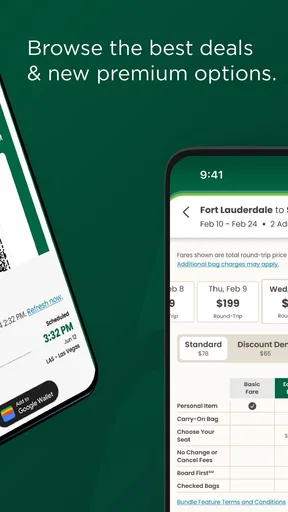
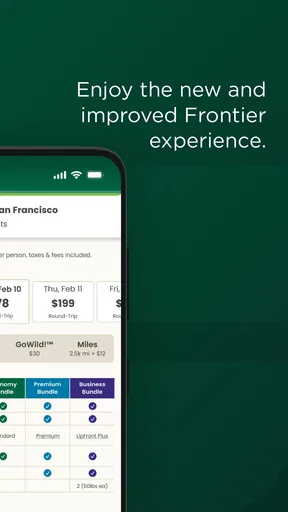
That simplicity is especially useful for a traveler who knows the dates but has not settled on the full cost. Frontier’s booking flow presents optional choices such as checked baggage, seat selection, and priority boarding alongside the flight decision. I would slow down at this point rather than treat the first fare shown as the whole trip cost: compare the fare with the add-ons you actually need before checking out. A low starting fare is only useful if the final combination suits your plans.
For a family or a group, this is also where a little preparation helps. Decide who needs a checked bag and whether sitting together matters before you begin tapping through the booking steps. That makes it easier to compare the available choices as a group instead of making hurried decisions one screen at a time. The app keeps those choices in the booking flow, but the traveler still has to judge which extras are worth paying attention to.
How Frontier’s app fits into everyday travel
I find Frontier’s app most useful when it has a clear job to do: helping me move from a booked flight to the practical details of travel day. In this section, I’ll focus on how it fits around ordinary routines—checking plans while packing, deciding what to handle on the phone, and knowing when a broader travel tool is the better starting point.
Booking Made Easy
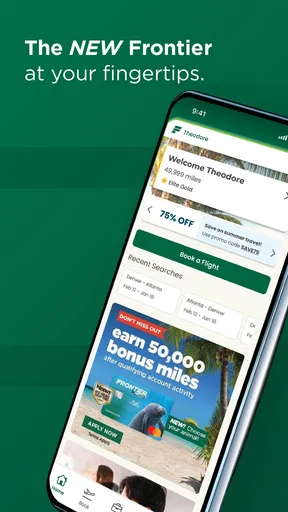
Booking a flight through the app is as simple as pie. You start by entering your departure and arrival cities, select your dates, and voilà, a list of available flights pops up. The app provides a clear breakdown of fare options, allowing you to choose what suits your budget and needs. I particularly appreciated the transparency in pricing; no hidden fees suddenly appearing at checkout.
The app also offers the option to add extras like checked baggage, seat selection, and priority boarding during the booking process. It’s all laid out in a straightforward manner, which means fewer headaches for you as a traveler.
When the trip becomes a routine
The month-to-month value is less about browsing and more about having a dependable place to revisit an existing reservation. If I fly Frontier more than once, the app can become the natural place to check my itinerary, look at flight status, and keep the boarding pass available. That repeated use is more practical than installing it for a single search and then forgetting it, particularly for someone who prefers a phone-based travel routine.
Its appeal is narrower than that of a broad travel-booking app. A general travel service can be more convenient when I am comparing several airlines or trying to organize hotels and other parts of a trip in one planning session. Frontier’s own app is the more direct option when I have chosen this airline and want to manage that booking without switching between a search service and the carrier. I would use the two types of apps for different jobs rather than expect one to replace the other.
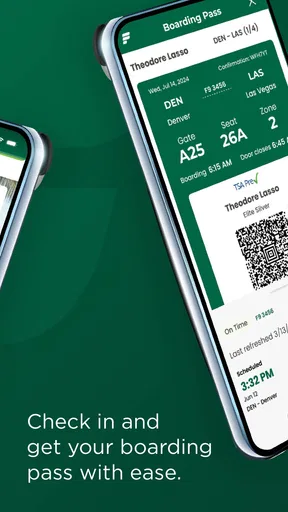
A realistic example: I book a Frontier flight for a weekend away, add only the baggage and seat options that fit my plans, then check the itinerary again while packing. On travel day, I can look up the flight status and bring up the boarding pass from the app instead of searching through email or carrying a printout. That is a small convenience, not a guarantee that travel will go smoothly, but it reduces the number of places I need to look for basic trip details.
Manage Your Trip
Once your flight is booked, the app helps you manage your trip effortlessly. You can view your itinerary, check flight status, and receive real-time updates. I found it incredibly handy to have my boarding pass readily available in the app, eliminating the need for printing or unnecessary paper waste.
Another feature worth mentioning is the ability to change or cancel your flight directly through the app. Life happens, plans change, and having this flexibility at your fingertips is invaluable.
Even so, I would treat in-app changes as a convenient starting point, not a reason to make a rushed decision. If plans shift, first check the details of the reservation and what the available change or cancellation choices mean for your situation. A screen that makes an action easy does not remove the need to understand its consequences. For a straightforward adjustment, doing it on the phone may be less work than switching to a computer; for a complicated itinerary, I would take time to review everything carefully before confirming.
For day-to-day use, I would also make a habit of checking the itinerary before leaving for the airport rather than relying on memory or an old screenshot. The app’s flight-status and update tools are most useful when opened at the moments a traveler actually needs them: while preparing to leave, during the journey to the airport, and when plans may have changed. Keeping the app installed does not replace checking current travel details, but it gives me a direct place to do so.
Rewards and reasons to return
Frontier’s frequent-flyer integration gives returning customers another reason to keep the app around. If I already participate in the airline’s rewards program, having mileage and rewards information alongside my trips can make routine use feel more worthwhile. It is a feature for people who expect to fly Frontier again; it will matter much less to someone taking one isolated flight or choosing an airline solely by whichever itinerary works best.
The app also surfaces promotions and discounts for app users. I would check those when I am already considering a trip, but I would not let a promotion dictate the destination or make me book before comparing the complete fare and extras. The useful habit is to treat a deal as one input in the decision, not proof that the trip is automatically the best value.
Maintenance without much fuss
Keeping the app on my phone is easiest to justify when I have a booking to manage or expect to fly Frontier again. Between trips, it does not need to become a daily destination. I can open it when I want to search, review a reservation, or check rewards, then leave it alone until the next relevant task. That is a healthier pattern than expecting an airline app to provide a reason to browse every day.
Frontier Airlines is the developer, and the app is free to install. It is rated for everyone, has a 4.7 average from around 163,000 ratings, and has been installed over 5 million times. Its current version is 3.5.2 Build-840, and it requires Android 11 or later. Those details make it easy to assess whether it fits a compatible Android phone, but they do not change the practical point: its recurring value comes from having Frontier travel to manage.
For an occasional traveler, maintenance mostly means keeping the app available until the trip is over and checking that the phone can run it. Someone with limited storage or a preference for keeping only frequently used apps may reasonably install it when planning a Frontier trip and remove it afterward. A regular customer is more likely to benefit from leaving it in place, especially if the itinerary and rewards tools are part of their normal travel routine.
Where the routine can wear thin
The main limitation is that the app is tied to one airline. It is not the best place to begin if I am undecided between carriers, need to compare a wide range of travel providers, or want one central app for unrelated reservations. In those cases, an airline-neutral search or planning tool is a better first stop. Once I choose Frontier, the airline’s app becomes more relevant for the booking and the trip itself.
There is also a practical difference between a smooth booking screen and a smooth travel experience. The app can put an itinerary, status information, and boarding pass within reach, but I still need to review my choices and stay attentive to updates. I would not assume that having a boarding pass saved on the phone is enough preparation on its own; keeping the phone charged and checking the current trip details are simple habits that make the digital approach more reliable.
For someone who rarely flies Frontier, the rewards section and repeated trip-management convenience may not be enough to earn permanent space on the home screen. For a frequent customer, those same features can save small amounts of effort each time. That is why my recommendation depends more on travel habits than on the novelty of downloading a new app. Its strongest case is repeated use tied to actual bookings, not collecting airline apps just in case.
Miles and More
For frequent flyers, the app integrates with Frontier’s frequent flyer program, making it easy to keep track of your miles and rewards. Earning miles with every flight and redeeming them for future travels is seamlessly integrated, which is a great way to keep loyal customers coming back for more.
Additionally, the app offers promotions and discounts exclusively for app users, so it’s worth keeping an eye on those if you’re looking to snag a deal.
User Experience
Overall, the user experience with the app is smooth and intuitive. The developers have clearly put a lot of thought into making it user-friendly, which is something I always appreciate in a mobile app. The loading times were quick, and I didn’t encounter any crashes or bugs during my use, which is always a relief when you’re trying to manage travel plans.
What I would keep in mind is that a good interface is valuable because it helps me complete specific tasks, not because it removes every travel decision. I still need to compare the full cost of a flight, choose extras thoughtfully, and review trip information when plans change. Used with that bit of care, the app can be a practical companion rather than another source of distraction.
Who should keep it, and who can skip it
I would recommend Frontier Airlines to people who have booked with the carrier or expect to do so again and want their booking, flight status, boarding pass, and rewards close together. It is particularly suited to travelers comfortable handling routine trip tasks on a phone. Someone planning a one-off journey with no interest in Frontier rewards can still use it for the booking, but may not find enough ongoing value to keep it installed afterward.
If I were comparing airlines, organizing a multi-carrier itinerary, or looking for a single home for every part of a vacation, I would begin with a broader travel tool and use the airline app only after settling on a Frontier flight. If I already know that Frontier is the right choice, the direct app is the more focused companion. That distinction helps set realistic expectations: it is a useful airline-specific tool, not a complete replacement for every travel service.
Long-term verdict
In a nutshell, the Frontier Airlines app is a solid choice for anyone looking to simplify their travel bookings. With its easy navigation, clear pricing, and comprehensive trip management features, it takes a lot of the stress out of flying. Whether you’re a seasoned traveler or someone planning a once-in-a-lifetime trip, this app has something to offer.
So next time you’re planning a getaway, give the Frontier Airlines app a try. It might just become your new favorite travel companion!
My more measured take is that it earns lasting space when Frontier is part of your regular travel pattern. The first booking shows what it can do; the ongoing value comes from returning to the itinerary and travel tools when you need them. If your flights are spread across many airlines, a neutral planner may be more useful day to day. If Frontier is already your choice, keeping its app available is a straightforward way to manage the trip without making the process more complicated than it needs to be.
Privacy and Permissions
See what permissions an app requests and how it handles your data.
- Location
- approximate location (network-based), precise location (GPS and network-based)
- Camera
- take pictures and videos
- Wi-Fi connection information
- view Wi-Fi connections
- Other
- view network connections, pair with Bluetooth devices, access Bluetooth settings, change network connectivity, full network access, run at startup, reorder running apps, control vibration, prevent device from sleeping, modify system settings
Verdict
Strengths of Frontier Airlines
- User-friendly interface for easy navigation.
- Affordable flight options with frequent deals.
- Quick booking process saves time.
- Real-time flight updates keep you informed.
- Frequent flyer program offers great rewards.
Limitations of Frontier Airlines
- Limited in-flight entertainment options.
- Extra fees for seat selection and baggage.
- Customer service can be hard to reach.
- No free snacks or drinks on board.
- Limited legroom in economy class.
Similar Picks in This Category
View All
Google Maps
Google LLC3.4

Google Maps Go
Google LLC4.1

Booking.com: Hotels & Travel
Booking.com Hotels & Vacation Rentals4.8

Google Earth
Google LLC3.8

Skyscanner Flights Hotels Cars
Skyscanner Ltd4.8

trivago: Compare hotel prices
trivago N.V.4.4
Frequently Asked Questions
What features does the Frontier Airlines app offer?
The Frontier Airlines app provides a range of features designed to enhance the travel experience. Users can book flights, check-in, view their boarding pass, and receive real-time flight updates. Additionally, the app offers seat selection, baggage tracking, and access to frequent flyer accounts, making travel management convenient and efficient.
Is the Frontier Airlines app available for both Android and iOS devices?
Yes, the Frontier Airlines app is available for download on both Android and iOS platforms. Users can find the app on the Google Play Store for Android devices and the Apple App Store for iOS devices. The app is regularly updated to ensure compatibility and performance improvements across all devices.
Are there any costs associated with using the Frontier Airlines app?
Downloading and using the Frontier Airlines app is free. However, any transactions made through the app, such as booking flights or selecting seats, will incur the usual fees associated with those services. Users should also be aware of potential data charges from their mobile service provider while using the app.
How user-friendly is the Frontier Airlines app interface?
The Frontier Airlines app is designed with user experience in mind, offering an intuitive and straightforward interface. Navigation is smooth, with clear icons and easy-to-read text, ensuring that users can quickly find the information they need. The app also includes customer service contact options for additional support.
What should I do if the Frontier Airlines app crashes or freezes?
If the Frontier Airlines app crashes or freezes, first try restarting your device and reopening the app. Ensure that you have the latest version installed, as updates often fix bugs and improve stability. If problems persist, check your device's storage and internet connection, or contact Frontier Airlines customer support for further assistance.
